

Why Most SAP Implementations Fail (And How to Avoid It)
SAP implementations fail when technical delivery progresses without sufficient business preparation. Unclear requirements, poor data quality, weak governance, and inadequate employee adoption can undermine a project even after successful deployment.
According to Panorama Consulting Group’s 2025 ERP Report, 31.4% of surveyed enterprise software projects exceeded their budgets. These findings cover multiple ERP vendors and should not be interpreted as SAP-specific failure rates.
For business leaders, implementation success means achieving reliable operations, trusted reporting, and measurable business improvements, not simply launching software.
What Does SAP Implementation Failure Mean?
SAP implementation failure occurs when an ERP project does not achieve its intended financial, operational, or organizational outcomes.
Failure may involve:
- Budget overruns and delayed deployment
- Disrupted business operations
- Unreliable reporting and inconsistent data
- Low employee adoption
- Continued dependence on manual processes
A system can become technically operational while employees continue maintaining spreadsheets or working around inefficient processes.
Therefore, implementation success requires evaluating system performance alongside business outcomes and employee readiness.
Why Do SAP Implementations Fail?
SAP implementations fail because technology, processes, people, and governance are not coordinated effectively.
An empirical study published in the Business Process Management Journal examined ERP implementation failures in India’s retail sector. Researchers identified inadequate resources, insufficient management commitment, user resistance, unrealistic scheduling, and ineffective change management among important failure factors.
These findings relate specifically to the studied sector and should not be generalized into universal SAP failure statistics.
The following 12 causes explain how implementation risks develop and how organizations can reduce their impact.
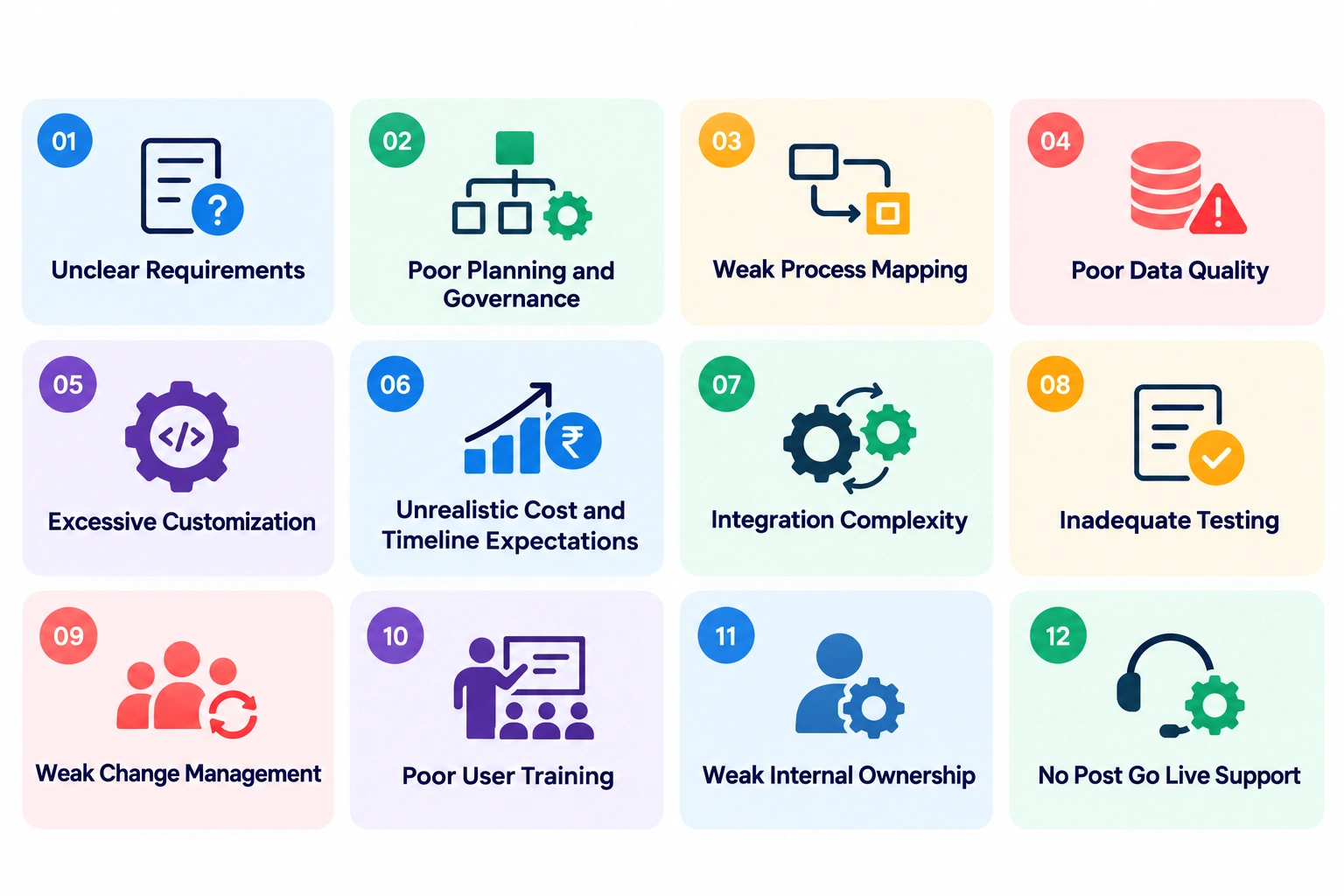
Failure Cause 1: Unclear Requirements
Unclear requirements create conflicting expectations and uncontrolled changes during implementation.
Finance teams may prioritize faster reconciliation, procurement may require supplier visibility, and operations may expect improved inventory accuracy.
Without agreed objectives, individual requests can expand the project without improving its overall value.
A structured SAP implementation process should establish measurable business outcomes before configuration begins.
Preventive control: Assign process owners, document requirements, and distinguish critical needs from preferences.
Warning sign: Major requirements continue changing after design approval.
Failure Cause 2: Poor Planning and Governance
Poor planning and governance delay decisions and allow unresolved problems to accumulate across implementation phases.
The official SAP Activate Methodology provides a structured approach covering discovery, preparation, process validation, realization, deployment, and ongoing operations.
Effective SAP implementation project planning should establish project ownership, escalation procedures, approval authority, and delivery milestones.
Preventive control: Create a governance structure with accountable executive, functional, technical, and data owners.
Warning sign: Critical decisions remain unresolved beyond their agreed deadlines.
Failure Cause 3: Weak Process Mapping
Weak process mapping causes implementation teams to overlook how business transactions actually operate.
Organizations frequently depend on informal approvals, manual calculations, spreadsheets, and undocumented exceptions.
If these dependencies are discovered during testing, teams may need to redesign workflows after configuration is complete.
Preventive control: Map current processes, validate future workflows, and document exceptions involving multiple departments.
For example, procurement design should account for purchasing, inventory, approvals, supplier transactions, and financial postings.
Warning sign: Significant process gaps emerge during user acceptance testing.
Failure Cause 4: Poor Data Quality
Poor data quality creates migration errors, reporting inconsistencies, and reduced confidence in the new ERP system.
Panorama Consulting Group’s 2025 ERP research identified data problems as the most commonly reported reason among surveyed projects experiencing timeline overruns.
Common issues include duplicate suppliers, inconsistent material codes, missing financial records, and incorrect customer information.
Preventive control: Begin data profiling early, assign business data owners, and conduct multiple migration rehearsals.
Warning sign: Significant reconciliation exceptions remain unresolved near deployment.
Data validation requires business participation because technical teams cannot independently determine whether every migrated record is operationally correct.
Failure Cause 5: Excessive Customization
Excessive customization increases development effort, testing requirements, maintenance costs, and architectural complexity.
Some custom functionality is necessary for specialized processes or compliance requirements. Problems arise when organizations recreate existing workflows simply because employees are familiar with them.
SAP Learning’s standardized implementation framework describes clean-core practices and quality gates intended to support maintainable solutions.
Preventive control: Evaluate standard SAP functionality before approving custom development.
Warning sign: Customization requests increase continuously after requirements have been approved.
Failure Cause 6: Unrealistic Cost and Timeline Expectations
Unrealistic estimates arise when leadership underestimates data preparation, integrations, testing, training, and internal resource commitments.
Panorama’s 2025 ERP Report reported a nine-month median implementation duration across its enterprise software sample. This is not a guaranteed SAP timeline.
Accurate SAP implementation cost and timeline planning requires estimates based on actual business complexity and technical dependencies.
Preventive control: Establish detailed workstream budgets, resource assumptions, and risk-based contingency.
Warning sign: Forecast spending increases while critical milestones remain incomplete.
Failure Cause 7: Integration Complexity
Integration complexity creates operational failures when SAP cannot exchange accurate information with connected applications.
An SAP S/4HANA implementation may involve CRM platforms, banking systems, manufacturing applications, procurement tools, and analytics environments.
Each connection introduces requirements involving security, data ownership, error handling, and transaction validation.
Preventive control: Document interface dependencies early and test complete business scenarios rather than isolated connections.
Warning sign: Individual interfaces work correctly, but end-to-end transactions repeatedly fail.
Failure Cause 8: Inadequate Testing
Inadequate testing allows unresolved technical and operational issues to reach production.
Testing should cover configuration, integrations, security permissions, migrated data, financial reconciliation, and realistic business exceptions.
A purchase order, for example, may affect purchasing approvals, inventory, supplier balances, financial postings, and reporting.
Preventive control: Establish formal testing responsibilities and measurable deployment acceptance criteria.
Warning sign: High-severity defects remain unresolved while the organization continues preparing for go-live.
Business users should validate actual working processes rather than relying exclusively on technical test results.
Failure Cause 9: Weak Change Management
Weak change management reduces adoption when employees do not understand how new processes affect their responsibilities.
The Indian retail ERP failure study published by Emerald identifies employee resistance and ineffective organizational change management among significant implementation risks in its research sample.
Communication alone is insufficient when employees lack practical preparation.
Preventive control: Explain role changes, involve employees in testing, and provide opportunities for structured feedback.
Warning sign: Departments continue preparing separate spreadsheets instead of using approved SAP processes.
Failure Cause 10: Poor User Training
Poor user training occurs when employees learn system navigation without understanding their actual business responsibilities.
Finance teams need reconciliation and exception-handling scenarios. Procurement users need purchasing approvals, supplier transactions, and invoice workflows.
Training should also prepare employees for unusual situations rather than routine transactions alone.
Preventive control: Deliver role-specific sessions with practical exercises and task-based assessments.
Warning sign: Employees cannot independently complete critical transactions before deployment.
Training effectiveness should be measured through demonstrated capability, not attendance alone.
Failure Cause 11: Weak Internal Ownership
Weak internal ownership leaves essential process and data decisions dependent on external consultants.
Implementation partners contribute specialist knowledge, but organizations must retain accountability for business requirements, data accuracy, operational policies, and acceptance criteria.
Without responsible business owners, unresolved questions can move between departments indefinitely.
Preventive control: Assign named owners to critical processes, data domains, and implementation approvals.
Warning sign: No internal stakeholder can formally approve the future-state process.
Failure Cause 12: No Post Go Live Support
Missing post-go-live support allows operational defects, access problems, and user confusion to continue after launch.
The official SAP Activate framework includes a Run phase covering system operations, support, and continuous optimization.
Organizations should establish hypercare responsibilities before deployment.
Preventive control: Define escalation procedures, incident ownership, integration monitoring, and support handover requirements.
Warning sign: Recurring operational issues have no clearly accountable resolution team.
What Are the Biggest SAP Implementation Risks?
The biggest SAP implementation risks are problems capable of affecting multiple business functions simultaneously.
| Risk | Early warning indicator | Management response |
| Unclear scope | Frequent requirement changes | Formal change governance |
| Poor data | Migration reconciliation errors | Data cleansing and validation |
| Excess customization | Growing development backlog | Fit-to-standard review |
| Integration gaps | Failed end-to-end transactions | Dependency testing |
| Weak adoption | Continued manual workflows | Targeted training |
| Cutover failure | Unresolved critical defects | Enforce release criteria |
These indicators help prioritize intervention but are not universal SAP thresholds.
Organizations should assess severity, likelihood, business impact, and available corrective actions.
What Are the Warning Signs of SAP Project Failure?
SAP project failure typically develops through warning signs visible before implementation deadlines are missed.
Leadership should monitor:
- Delayed business approvals
- Rising forecast expenditure
- Unresolved data reconciliation problems
- Failed integration test scenarios
- Critical defects approaching cutover
- Incomplete employee readiness assessments
These measures should be reviewed regularly against project-specific acceptance criteria.
A growing number of unresolved issues is particularly concerning when the remaining implementation schedule becomes shorter.
How Can SAP Implementation Failure Be Prevented?
SAP implementation failure risk can be reduced through early planning, accountable ownership, reliable data preparation, and continuous project controls.
An effective prevention framework combines:
- Measurable business objectives
- Approved scope and process ownership
- Early migration and integration testing
- Controlled customization
- Realistic financial forecasting
- Role-based employee training
- Defined go-live readiness criteria
- Structured post-launch support
The most important principle is addressing problems before they create dependencies across multiple workstreams.
Implementation governance should operate throughout delivery, not only during project kickoff.
Can an SAP Implementation Partner Reduce Risk?
An experienced SAP implementation partner can reduce delivery risk by providing specialist capabilities in architecture, migration, configuration, integrations, and testing.
However, a partner cannot compensate entirely for unclear business goals or absent internal decision-makers.
Organizations should evaluate relevant implementation experience, governance practices, technical expertise, knowledge transfer, and post-launch support.
A partner’s approach to risk identification and issue resolution is often more informative than consulting rates alone.
How Webvillee Helps Reduce SAP Implementation Risk
Webvillee provides SAP implementation services that align ERP capabilities with business requirements, helping organizations assess processes, plan integrations, and manage delivery dependencies.
As an SAP implementation partner, Webvillee supports organizations through ERP planning, process mapping, configuration, data migration, testing, and ongoing optimization.
Webvillee’s SAP implementation and support services can help businesses evaluate technical readiness, establish implementation responsibilities, and define measurable project outcomes.
An effective assessment should identify critical risks, required resources, delivery milestones, and operational readiness criteria.
Building an SAP Implementation With Lower Risk
Successful SAP implementation depends on identifying problems early enough to prevent operational disruption.
Clear requirements, responsible leadership, reliable data, controlled customization, comprehensive testing, and sustained employee adoption provide a stronger foundation than an aggressive deployment deadline.
Organizations should evaluate implementation success through stable processes, trustworthy reporting, and measurable business improvements.